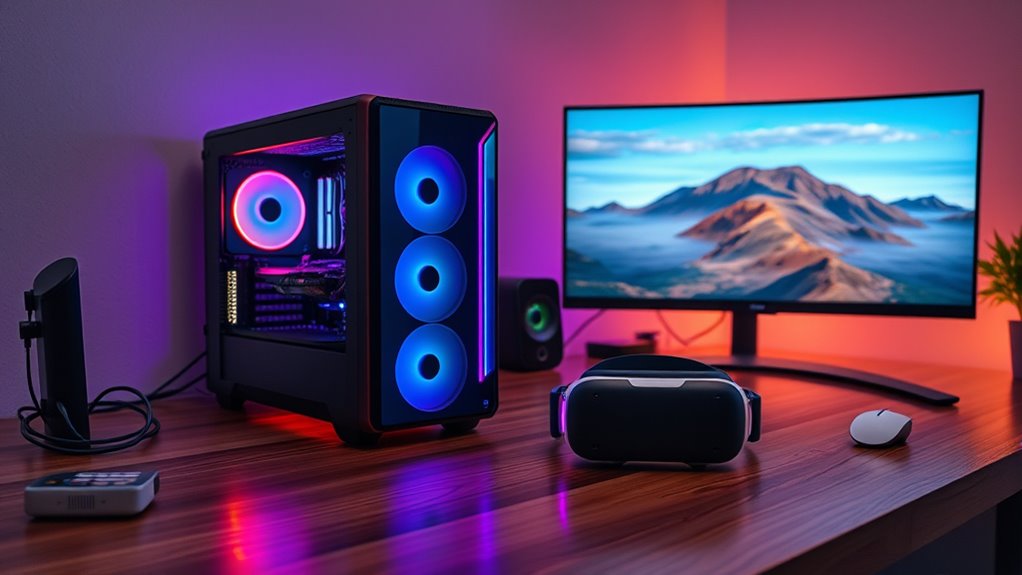

As virtual reality continues to advance, choosing the right setup is key for an immersive experience. For 2026, I’ve selected the CLX Set Gaming PC as the best high-performance desktop for VR gaming and multitasking, while the Meta Quest 2 stands out as the most portable, standalone VR headset. Each offers distinct advantages and tradeoffs: the desktop delivers raw power but at a higher cost and space requirement, whereas the standalone headset provides convenience and mobility but with limited storage and processing capabilities.

Get oils, diffusers and self-care delivered free with Prime
- Fast, free delivery on millions of items
- Prime Video, Amazon Music and more included
- Member-only deals all year
Key Takeaways
- The CLX Set Gaming PC offers top-tier performance for demanding VR applications but requires significant space and investment.
- Meta Quest 2 provides a wireless, portable VR experience ideal for casual use and on-the-go gaming, with some limitations in storage and content flexibility.
- Choosing between these depends on whether you prioritize raw power and customization or mobility and ease of use.
- Both options are designed to support modern VR standards, but their roles differ significantly—one as a powerful desktop, the other as a standalone headset.
- Understanding your space, budget, and preferred VR experiences helps determine the best fit for your needs.
| CLX Set Gaming PC – AMD Ryzen 7 7800X3D, GeForce RTX 5070, 2TB NVMe SSD, 6TB HDD, 64GB DDR5, 360mm AIO, WiFi, Windows 11 Home, White |  | High-performance desktop for serious VR gaming and multitasking | Processor: AMD Ryzen 7 7800X3D 4.2GHz | GPU: GeForce RTX 5070 | Storage: 2TB NVMe SSD, 6TB HDD | VIEW ON AMAZON | See Our Full Breakdown |
| Meta Quest 2 — Advanced All-In-One Virtual Reality Headset — 128 GB |  | Wireless, portable VR for casual and on-the-go use | Storage: 128 GB | Type: All-in-One VR Headset | Wireless: Yes | VIEW ON AMAZON | See Our Full Breakdown |
| vrready deskpc | Storage | Processor | GPU | Memory |
|---|---|---|---|---|
| CLX Set Gaming PC | 2TB NVMe SSD, 6TB HDD | AMD Ryzen 7 7800X3D 4.2GHz | GeForce RTX 5070 | 64GB DDR5 |
| Meta Quest 2 | 128 GB | — | — | — |
More Details on Our Top Picks
CLX Set Gaming PC – AMD Ryzen 7 7800X3D, GeForce RTX 5070, 2TB NVMe SSD, 6TB HDD, 64GB DDR5, 360mm AIO, WiFi, Windows 11 Home, White
The CLX Set Gaming PC is built for VR enthusiasts who demand power and multitasking capability. Its AMD Ryzen 7 7800X3D processor and GeForce RTX 5070 GPU deliver smooth, immersive visuals even in the most demanding titles. The large storage options—including a speedy 2TB NVMe SSD and a 6TB HDD—support quick load times and ample space for game libraries. The 64GB DDR5 memory and 360mm liquid cooling ensure stability during extended gaming sessions. Compared to more modest setups, this PC is a clear choice for those who want no compromises, but its size and high price make it less suitable for smaller spaces or budget-conscious buyers.
Pros:- Unmatched processing and graphics power for demanding VR applications
- Large, fast storage for quick access and extensive libraries
- Robust cooling and high-quality components for long-term reliability
- Widespread connectivity options including WiFi
Cons:- High power consumption and higher energy costs
- Bulky size requiring ample space
- Premium price tag that may be prohibitive for some
Best for: Serious VR gamers and multitaskers seeking top-tier performance
Not ideal for: Casual users or those with limited space and budget constraints
- Processor:AMD Ryzen 7 7800X3D 4.2GHz
- GPU:GeForce RTX 5070
- Storage:2TB NVMe SSD, 6TB HDD
- Memory:64GB DDR5
- Cooling:360mm AIO liquid cooling
- Connectivity:WiFi, wired network
Our verdict“This desktop makes the most sense for dedicated VR enthusiasts who need maximum performance and have space and budget flexibility.”
Meta Quest 2 — Advanced All-In-One Virtual Reality Headset — 128 GB
The Meta Quest 2 is ideal for users who want a hassle-free, wireless VR experience without the fuss of external PCs. Its 128 GB storage supports a broad library of over 500 titles, spanning gaming, fitness, and social apps. The headset’s built-in sensors and hand tracking create immersive experiences without needing external sensors or cables. While it’s highly portable and easy to set up, its limited storage and processing power mean it’s best suited for casual or intermediate users rather than hardcore gamers who want the latest high-fidelity experiences. It also requires a dedicated play space for safe use, which could be a limitation for smaller rooms.
Pros:- Wireless and lightweight for versatile use anywhere
- Large content library with over 500 titles
- Intuitive controls and immersive 3D audio
- Quick and easy setup
Cons:- Limited internal storage for extensive game libraries
- Requires ample play space for safe movement
- Not designed for high-end, graphics-intensive VR experiences
Best for: Casual VR users, those valuing portability and ease of setup
Not ideal for: Power users and those with extensive VR libraries or demanding graphics needs
- Storage:128 GB
- Type:All-in-One VR Headset
- Wireless:Yes
- Built-in Battery:Yes
- Number of Titles:Over 500
Our verdict“This headset makes the most sense for casual users or newcomers who prioritize convenience and portability over raw power.”

How We Picked
My picks are based on balancing performance, ease of use, and versatility for VR in 2026. I prioritized PCs with high-end specs suitable for demanding VR titles, considering factors like graphics card, processor, and expandability. The standalone headset was chosen for its wireless convenience, library size, and portability. I also evaluated user reviews, latest hardware standards, and the overall value each offers for immersive VR experiences tailored to different types of users.
Factors to Consider When Choosing Vrready Deskpcs
Choosing the right VR setup in 2026 depends on whether you want raw power for high-fidelity gaming or a portable headset for casual use. The decision hinges on your preferred type of VR experience, available space, and budget. Here, I outline what to consider when selecting a VR-ready desktop or headset, along with key features to match your needs.
Performance and Power
If you’re aiming for immersive, graphics-rich VR experiences, a desktop like the CLX Set Gaming PC provides the processing muscle needed to run demanding titles smoothly. Look for high-end CPUs, powerful GPUs, and ample RAM. For casual or social VR, a standalone headset like the Meta Quest 2 offers a decent experience with less fuss, though it sacrifices some detail and expandability.
Portability and Space
Desktop PCs require a dedicated space and more setup time, but they deliver superior performance. Conversely, standalone VR headsets are lightweight and portable, perfect for moving between rooms or taking on trips. Consider your available space and how often you’ll use VR in different locations.
Content and Compatibility
High-end PCs can run the latest VR titles at maximum settings, with support for mods and extensive libraries. Standalone headsets like the Quest 2 have their own ecosystems and are best for casual gaming and social apps. If you want a broad variety of content and future-proofing, a capable desktop might be the better choice.
Budget and Future-proofing
Premium desktop setups demand a larger investment but provide room for upgrades and future VR advances. The Quest 2 offers an affordable entry point with minimal upfront costs but may need upgrades or replacements sooner as VR tech evolves.
Ease of Use
Desktop VR requires more setup, including connecting cables and configuring hardware. Standalone headsets are plug-and-play, with intuitive controls, making them appealing for users who want quick access to VR without technical hassle.
Frequently Asked Questions
Can a VR-ready desktop handle the latest VR games?
Yes, a high-end VR-ready desktop like the CLX Set Gaming PC is equipped to run the newest VR titles at high settings, thanks to its powerful CPU, GPU, and ample RAM. It’s built for demanding applications, ensuring smooth performance even in graphically intense experiences.
Is the Meta Quest 2 suitable for serious gaming?
The Meta Quest 2 works well for casual and mid-level gaming, especially due to its portability and ease of use. However, it may fall short for high-end, graphics-intensive VR titles that require more processing power, which a desktop PC can handle better.
What are the main tradeoffs between a desktop VR setup and a standalone headset?
Desktop VR setups offer superior performance, customization, and content options but require more space, setup time, and investment. Standalone headsets like the Quest 2 prioritize portability, ease of use, and affordability but limit processing power, storage, and support for the most demanding VR experiences.
How important is storage space for VR headsets?
Storage space is vital if you plan to download many VR titles or high-quality experiences. While the Quest 2 offers 128 GB, this can fill up quickly with large games. Desktop PCs typically have multiple storage options, allowing for extensive libraries without space concerns.
Do I need a dedicated space for VR, regardless of the device?
Yes, especially for room-scale VR with motion tracking, a safe, clear play area is necessary. The Quest 2 requires a designated space to move freely, while a powerful desktop can be used with stationary experiences or in larger rooms for full-room tracking systems.
Conclusion
If you’re a dedicated VR gamer seeking maximum performance and have space and budget to match, the CLX Set Gaming PC is the best choice. For casual users, social VR, or those prioritizing portability, the Meta Quest 2 offers a compelling, easy-to-use option that doesn’t compromise on fun, albeit with some limitations in content and power.