
For most desks, I’d start with the Edifier M60: it pairs a compact footprint with higher-end sound features and Bluetooth. The Edifier MR3 is a better match if you want studio-style monitors, while the Creative Pebble V3 keeps setup simple with USB-C and Bluetooth. The main tradeoffs are sound quality versus desk space, and richer connectivity versus a straightforward plug-in setup. Read on for how all 12 options differ and which one fits your setup.

Get oils, diffusers and self-care delivered free with Prime
- Fast, free delivery on millions of items
- Prime Video, Amazon Music and more included
- Member-only deals all year
Key Takeaways
- Edifier M60 stands out as the most balanced pick, combining a compact desktop format with 66W RMS, Bluetooth 5.3, and Hi-Res Audio support.
- Edifier MR3 and Edifier QR65 put more emphasis on monitor-style listening and higher output, but ask for more desk space and setup attention than basic computer speakers.
- Creative Pebble V3 is the clearest choice for a tidy, modern connection setup, with USB-C and Bluetooth in a small 2.0 design.
- The two Amazon Basics pairs and Creative Pebble 2.0 models prioritize simple, compact desktop audio; they offer fewer connection and sound-shaping options than the Edifier models.
- Logitech Z313 is the only 2.1 system here, so its separate subwoofer may suit bass-focused listening, though it takes more floor or under-desk space.
| Logitech Z313 2.1 Speaker System with Subwoofer | 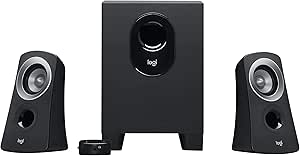 | Best for Bass on a Simple Setup | Speaker type: 2.1 computer speakers | Power output: 50W peak / 25W RMS | Connectivity: 3.5mm audio jack | VIEW ON AMAZON | See Our Full Breakdown |
| Edifier QR65 RGB Light Desktop Active Monitor, 70W RMS, Hi-Res Audio, White |  | Best Feature-Rich Desk Upgrade | Power: 70W RMS | Audio resolution: 24-bit/96kHz | Bluetooth: Version 5.3 | VIEW ON AMAZON | See Our Full Breakdown |
| Edifier MR3 Powered Studio Monitor Speakers (Pair) |  | Best for Wired Monitoring | Type: Active studio monitor pair | Audio output: 18W x 2 RMS | Frequency response: 52Hz–40kHz | VIEW ON AMAZON | See Our Full Breakdown |
| OHAYO 60W Computer Speakers for Music and Gaming, Bluetooth 5.3, Stereo 2.0, 3.5mm Aux RCA USB Input, Black |  | Best for Multiple Everyday Sources | Speaker type: Stereo 2.0 | Power output: 60W (30W x 2) | Connectivity: Bluetooth 5.3, RCA, AUX, USB | VIEW ON AMAZON | See Our Full Breakdown |
| Redragon GS520 Anvil Wired 2.0 Stereo Desktop Speakers with RGB Lighting |  | Best Compact Pick for Basic PC Audio | Audio output: 2.0-channel stereo | Maximum output power: 3 watts | Speaker size: 2 inches | VIEW ON AMAZON | See Our Full Breakdown |
| Creative Pebble 2.0 USB Desktop Stereo Speakers for PC and Laptop, White |  | Best for Angled Desk Listening | Brand and model: Creative Pebble 2.0 (MF1680) | Speaker type: Computer speakers | Audio: 2-channel stereo | VIEW ON AMAZON | See Our Full Breakdown |
| Logitech Z207 2.0 Stereo Computer Speakers with Bluetooth |  | Best for Switching Between Devices | Brand and model: Logitech Z207 | Speaker type: Computer speakers | Audio: 2-channel stereo | VIEW ON AMAZON | See Our Full Breakdown |
| Amazon Basics Stereo 2.0 Speakers for PC or Laptop with Volume Control, 3.5mm Aux Input, USB-Powered, 1 Pair, Black |  | Best for Straightforward USB-Powered Setup | Brand: Amazon Basics | Speaker type: Multimedia speakers | Audio: 2.0 stereo | VIEW ON AMAZON | See Our Full Breakdown |
| Amazon Basics USB-Powered Computer Speakers with Volume Control |  | Best Compact Pick for Headphone Listening | Brand and model: Amazon Basics U213 | Audio: Stereo | Total RMS power: 2.2 watts (1.1 watts per speaker) | VIEW ON AMAZON | See Our Full Breakdown |
| Creative Pebble 2.0, USB Desktop Stereo Speakers for PC/Laptop, Black | 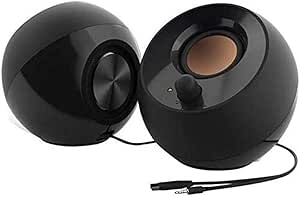 | Best Minimalist Black Desk Pair | Brand and model: Creative Pebble 2.0 | Speaker type: Desktop speakers | Audio: 2.0 stereo | VIEW ON AMAZON | See Our Full Breakdown |
| Creative Pebble V3, 2.0 USB-C Desktop Speakers, Bluetooth 5.0, Black |  | Best for Clear Desk Audio | Speaker configuration: 2.0 stereo pair | Drivers: 2.25-inch full-range drivers | Output: 8W RMS; up to 16W peak | VIEW ON AMAZON | See Our Full Breakdown |
| Edifier M60 Multimedia Speaker (Pair), 66W RMS, Bluetooth 5.3, Hi-Res Audio, Black | 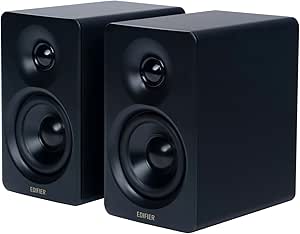 | Best for Premium Desktop Listening | Speaker configuration: Multimedia pair | Total output power: 66W RMS | Drivers: Two 3-inch mid-low drivers and two 1-inch tweeters | VIEW ON AMAZON | See Our Full Breakdown |
| deskspeaker | Connectivity | Speaker type | Dimensions |
|---|---|---|---|
| Logitech Z313 2.1 Speaker Syst | 3.5mm audio jack | 2.1 computer speakers | — |
| Edifier QR65 RGB Light Desktop | — | — | — |
| Edifier MR3 Powered Studio Mon | Bluetooth 5.4, balanced TRS, RCA, AUX, headphone out | — | 6.9 x 12.1 x 16.2 inches |
| OHAYO 60W Computer Speakers fo | Bluetooth 5.3, RCA, AUX, USB | Stereo 2.0 | — |
| Redragon GS520 Anvil Wired 2.0 | USB power and 3.5mm audio | — | 3.5 x 4 x 7 inches |
| Creative Pebble 2.0 USB Deskto | USB power and 3.5 mm AUX-in | Computer speakers | 4.57 × 4.8 × 4.53 in (D × W × H) |
| Logitech Z207 2.0 Stereo Compu | Bluetooth 4.2 and 3.5 mm input | Computer speakers | 4.88 × 1.39 × 9.49 in (D × W × H) |
| Amazon Basics Stereo 2.0 Speak | 3.5 mm auxiliary input | Multimedia speakers | — |
| Amazon Basics USB-Powered Comp | USB and 3.5 mm AUX input | — | 2.76 × 3.55 × 5.3 in (L × W × H) |
| Creative Pebble 2.0 | USB power and 3.5 mm AUX | Desktop speakers | 4.5 × 4.5 × 4.8 in |
| Creative Pebble V3 | — | — | — |
| Edifier M60 Multimedia Speaker | — | — | — |
More Details on Our Top Picks
Logitech Z313 2.1 Speaker System with Subwoofer
The Z313 is the clearest fit here for desk listeners who want a separate subwoofer without sorting through app controls or wireless features. Its 2.1 layout and 25W RMS output give music, films, and games more low-end weight than the Redragon GS520 Anvil’s small 2.0 speakers. A wired control pod also puts volume and headphone listening within reach, while the 3.5mm input keeps setup straightforward with a computer or other compatible source. That simplicity comes with limits: there is no Bluetooth, and the subwoofer and cables make placement less flexible than compact all-in-one desktop pairs. Choose the Z313 if bass presence matters more than wireless convenience or a tidy, minimal desk.
Pros:- Separate subwoofer adds bass depth that compact 2.0 models such as the Redragon GS520 Anvil cannot match
- Wired control pod provides accessible volume and headphone controls
- 3.5mm analog input works with a broad range of compatible devices
Cons:- No Bluetooth or Wi-Fi connectivity
- Subwoofer and cables constrain desk placement
- Not water-resistant
Best for: Desk listeners who want fuller bass for games, films, and music through a straightforward wired setup
Not ideal for: Buyers who need Bluetooth, minimal cabling, or the flexibility of small speakers without a separate subwoofer
- Speaker type:2.1 computer speakers
- Power output:50W peak / 25W RMS
- Connectivity:3.5mm audio jack
- Subwoofer diameter:9 inches
- Satellite speaker size:5.25 inches
- Mounting type:Tabletop
- Power source:Corded electric
Our verdict“Pick the Z313 if you want added bass from a dedicated subwoofer and are comfortable with a fully wired desk setup.”
Edifier QR65 RGB Light Desktop Active Monitor, 70W RMS, Hi-Res Audio, White
The QR65 suits a desk where speakers need to do more than play audio: 70W RMS power, Bluetooth 5.3, USB-C charging, and customizable lighting combine listening, device charging, and visual customization in one setup. Included adjustable stands help aim the sound toward the listener, a useful detail for nearfield desktop placement. Compared with the Edifier MR3, the QR65 emphasizes wireless Hi-Res playback, lighting, and charging rather than listing the MR3’s balanced TRS input and broad set of wired source connections. Its many controls and app-based customization can take time to learn, and the feature set may be more than a listener who just wants clear desktop audio needs. I’d choose it for a feature-focused workstation, not a bare-bones speaker setup.
Pros:- 70W RMS output and 24-bit/96kHz audio support
- Bluetooth 5.3 enables wireless playback
- Adjustable included stands help direct sound at the desk
- USB-C port supports up to 65W power
Cons:- App controls and multiple features add setup complexity
- Custom lighting and charging features may be unnecessary for listeners seeking basic desktop audio
Best for: Workstation owners who want wireless audio, adjustable speaker stands, lighting customization, and USB-C device charging
Not ideal for: Listeners who prefer simple wired controls or need the MR3’s listed balanced TRS and RCA connections
- Power:70W RMS
- Audio resolution:24-bit/96kHz
- Bluetooth:Version 5.3
- USB-C power:Up to 65W
- Lighting:Customizable effects with 16 million options
- Included accessories:Adjustable speaker stands
- Warranty:2 years
Our verdict“Choose the QR65 if a customizable, wireless desktop setup with USB-C charging matters as much as listening.”
Edifier MR3 Powered Studio Monitor Speakers (Pair)
The MR3 is the most connection-flexible pick here for a desk shared by a computer, recording gear, and headphones. Its balanced TRS, RCA, AUX, and headphone outputs support a wider mix of wired equipment than the Logitech Z313’s single 3.5mm input. Bluetooth 5.4 with multipoint adds convenient switching, while the listed 52Hz–40kHz response and 18W per channel describe a monitor-oriented 2.0 pair built for detail rather than a separate subwoofer’s bass impact. Compared with the Edifier QR65, the MR3 trades lighting and USB-C charging for a broader set of audio connections and a stated studio-monitor focus. Its larger listed dimensions and 9.9-pound weight call for careful desk planning, and buyers wanting stronger low-end weight may prefer the Z313’s dedicated subwoofer.
Pros:- Balanced TRS, RCA, AUX, Bluetooth, and headphone connections support varied desk sources
- Bluetooth 5.4 multipoint supports switching between devices
- Listed 52Hz–40kHz frequency response suits detail-focused listening
- MDF cabinet is specified in the product description
Cons:- No dedicated subwoofer for deeper bass
- Listed dimensions and weight may be demanding on a compact desk
- The product data conflicts on enclosure material, listing MDF in the description and plastic in specifications
Best for: Home recording hobbyists and desk listeners who need multiple audio inputs, headphone connection, and monitor-focused sound
Not ideal for: Buyers with limited desk space or listeners who prioritize deep bass from a dedicated subwoofer
- Type:Active studio monitor pair
- Audio output:18W x 2 RMS
- Frequency response:52Hz–40kHz
- Drivers:3.5-inch mid-low drivers and 1-inch tweeters
- Connectivity:Bluetooth 5.4, balanced TRS, RCA, AUX, headphone out
- Dimensions:6.9 x 12.1 x 16.2 inches
- Weight:9.9 pounds
- Warranty:2 years
Our verdict“Choose the MR3 if your desk needs flexible audio connections and monitor-oriented listening more than compact size or subwoofer bass.”
OHAYO 60W Computer Speakers for Music and Gaming, Bluetooth 5.3, Stereo 2.0, 3.5mm Aux RCA USB Input, Black
OHAYO’s appeal is connection choice in a straightforward stereo pair: Bluetooth 5.3, USB, RCA, and 3.5mm AUX let a desk setup accommodate several kinds of sources. The 30W-per-channel output and MDF enclosures make it a more substantial wired-and-wireless alternative to the Redragon GS520 Anvil, whose 3-watt maximum output and USB power suit basic computer listening instead. OHAYO keeps the desk simpler than the Logitech Z313 by avoiding a separate subwoofer, but that also means it lacks a dedicated driver for deeper bass. The product description calls its sound rich in mid-bass, yet the listed 3-inch full-range drivers do not replace a subwoofer for listeners who want pronounced low-end impact. It fits mixed-use desks better than bass-first setups.
Pros:- Bluetooth, USB, RCA, and AUX inputs offer flexible source connections
- 30W x 2 output gives it more stated power than the Redragon GS520 Anvil
- MDF enclosures provide a solid cabinet material
- Stereo 2.0 format avoids the extra subwoofer footprint of the Logitech Z313
Cons:- No built-in subwoofer for deeper bass
- No water-resistance specification is provided
Best for: Computer users who switch among Bluetooth, USB, RCA, and AUX sources for music, gaming, and everyday playback
Not ideal for: Bass-focused listeners who want a dedicated subwoofer or buyers who need stated weather resistance
- Speaker type:Stereo 2.0
- Power output:60W (30W x 2)
- Connectivity:Bluetooth 5.3, RCA, AUX, USB
- Drivers:0.75-inch tweeter and 3-inch full-range driver
- Enclosure material:MDF wood
- Design:Compact, modern aesthetic
Our verdict“Pick OHAYO for a versatile desk pair that can connect to several source types without adding a separate subwoofer.”
Redragon GS520 Anvil Wired 2.0 Stereo Desktop Speakers with RGB Lighting
The GS520 Anvil is for a desk where compact size and simple lighting controls matter more than room-filling sound. Its USB power and separate 3.5mm audio cable keep the connection routine familiar, while six touch-controlled RGB modes can be switched off when a quieter look suits the setup. Against the Logitech Z313, the GS520 takes up less space and avoids a separate subwoofer, but its 3-watt maximum output gives up the Z313’s stronger output and bass-focused 2.1 design. The small 2-inch speakers are best kept close to the listener; they are a poor match for buyers seeking substantial bass or stronger playback for games and films. I’d treat it as a modest desktop upgrade with visual flair, not as a high-output speaker system.
Pros:- Compact tabletop design suits tighter desks
- Six touch-controlled RGB modes include an option to turn lighting off
- Separate volume up and down buttons
- USB power and 3.5mm audio connection are compatible with computers and suitable devices
Cons:- 3-watt maximum output limits playback level
- Small 2-inch speakers lack the dedicated bass support of the Logitech Z313
- Wired setup requires both USB power and an audio connection
Best for: PC users with limited desk space who want simple stereo audio, USB power, and optional RGB lighting
Not ideal for: Listeners who want strong output, deep bass, or a wireless connection
- Audio output:2.0-channel stereo
- Maximum output power:3 watts
- Speaker size:2 inches
- Connectivity:USB power and 3.5mm audio
- Lighting:Six touch-controlled RGB modes
- Cable length between speakers:Up to 31 inches (80 cm)
- Dimensions:3.5 x 4 x 7 inches
- Weight:1.8 pounds
Our verdict“Choose the GS520 if compact, low-complexity PC audio and optional RGB matter more than power or bass.”
Creative Pebble 2.0 USB Desktop Stereo Speakers for PC and Laptop, White
The Creative Pebble 2.0 suits a desk where small speakers need to aim sound toward a seated listener. Its 45-degree elevated drivers and rear passive radiators are designed to project audio and add bass presence, while front controls keep volume changes within easy reach. Compared with the plainer Amazon Basics USB-Powered Computer Speakers, the Pebble gives more attention to listening angle and driver placement; the Logitech Z207 is a better fit if you want Bluetooth and easy switching between devices. This model stays deliberately simple, with USB power and a separate 3.5 mm AUX connection. That means less cable freedom than a wireless option, and its 4.4-watt maximum output is better suited to personal listening than filling a room. The white finish also makes it a more visible desk accent than the black alternatives.
Pros:- Angled drivers are designed to direct sound toward the listener
- USB power avoids a separate power adapter
- 3.5 mm AUX input works alongside USB power
- Front-facing volume controls are easy to reach
Cons:- Wired USB and AUX connections limit placement flexibility
- 4.4-watt maximum output is modest for shared or large rooms
- Compact enclosure limits low-frequency reach
Best for: Laptop and desktop users who want compact wired speakers angled toward a seated desk position, especially in a light-colored workspace
Not ideal for: People who want Bluetooth, room-filling volume, or one speaker system for multiple devices
- Brand and model:Creative Pebble 2.0 (MF1680)
- Speaker type:Computer speakers
- Audio:2-channel stereo
- Connectivity:USB power and 3.5 mm AUX-in
- Maximum output power:4.4 watts
- Frequency response:100 Hz
- Signal-to-noise ratio:86 dB
- Dimensions:4.57 × 4.8 × 4.53 in (D × W × H)
- Color:White
Our verdict“Choose the white Pebble for a compact, neatly angled wired setup; pick the Logitech Z207 if Bluetooth matters more.”
Logitech Z207 2.0 Stereo Computer Speakers with Bluetooth
The Logitech Z207 earns its place through flexibility: Bluetooth and a 3.5 mm input let it serve a computer, phone, tablet, or television, while Easy-Switch makes moving between two audio sources straightforward. That makes it more adaptable than the wired Creative Pebble 2.0, which is built around a computer desk. Each speaker pairs an active driver with a passive radiator, giving the setup a bass-supporting design without adding a separate subwoofer. The tradeoff is a taller, more substantial pair of speakers than the compact Pebble, and Bluetooth adds another connection method to manage. The Z207 is a sensible desk choice if your audio sources change during the day; if you mainly want a compact USB-powered PC setup, the Amazon Basics USB-Powered Computer Speakers have a simpler footprint and controls.
Pros:- Bluetooth and 3.5 mm input support varied audio sources
- Easy-Switch supports moving between devices
- Passive radiators extend bass without a separate subwoofer
- On-speaker controls and headphone jack are convenient at a desk
Cons:- Taller speakers take more vertical desk space than Creative Pebble 2.0
- Plastic enclosure offers a basic finish
- Not water-resistant
Best for: Desk users who regularly switch audio between a computer and a Bluetooth phone, tablet, or television
Not ideal for: Buyers who want a compact USB-powered pair with a minimal wired setup or need water-resistant speakers
- Brand and model:Logitech Z207
- Speaker type:Computer speakers
- Audio:2-channel stereo
- Connectivity:Bluetooth 4.2 and 3.5 mm input
- Peak power:10 watts
- Bluetooth range:10 meters
- Headphone connection:On-speaker headphone jack
- Dimensions:4.88 × 1.39 × 9.49 in (D × W × H)
- Color:Black
Our verdict“Pick the Z207 if you want one desk pair for Bluetooth and wired sources, and choose the Pebble if compact USB-powered simplicity matters more.”
Amazon Basics Stereo 2.0 Speakers for PC or Laptop with Volume Control, 3.5mm Aux Input, USB-Powered, 1 Pair, Black
For a basic computer desk, the Amazon Basics Stereo 2.0 focuses on the essentials: USB power, a 3.5 mm audio connection, and an in-line volume control. A bottom radiator is intended to give the small pair some bass presence, while the padded bases help protect the surface beneath them. Compared with Creative Pebble 2.0, this set has a more conventional layout rather than elevated, forward-aimed drivers; the Pebble may suit listeners who want speakers directed toward their chair. The Logitech Z207 is the stronger match for people who move between Bluetooth sources, but that extra flexibility is unnecessary if the speakers will stay connected to one PC. The Amazon Basics pair keeps the setup uncomplicated, though the supplied details do not give a power rating or dimensions, making output and desk fit harder to judge from the listing alone.
Pros:- USB power means no separate speaker adapter
- Inline volume control is easy to access
- Bottom radiator is designed to add bass presence
- Padded bases help protect the desk surface
Cons:- Wired USB and auxiliary connections restrict placement
- No output power figure is supplied in the provided product details
- No Bluetooth for wireless playback from phones or tablets
Best for: PC and laptop owners who want a simple, USB-powered stereo pair with reachable inline volume control
Not ideal for: Listeners who need Bluetooth, a stated output rating to compare power, or angled drivers aimed toward a seated position
- Brand:Amazon Basics
- Speaker type:Multimedia speakers
- Audio:2.0 stereo
- Connectivity:3.5 mm auxiliary input
- Power:USB-powered from a PC or laptop
- Controls:Inline volume control
- Enclosure material:Metal and plastic
- Finish:Black with blue LED lights
- Base:Scratch-free padded base
Our verdict“Choose this pair for a no-frills wired PC setup; the Logitech Z207 is more suitable when wireless device switching is a priority.”
Amazon Basics USB-Powered Computer Speakers with Volume Control
The Amazon Basics U213 is a compact, computer-focused option for buyers who want basic stereo sound and a headphone connection at the speakers. Its front-mounted volume and standby control keeps everyday adjustments simple, and USB power supports a plug-and-play setup without a separate adapter. The 2.2-watt total RMS output sets expectations: this pair is aimed at nearby personal listening, not loud playback across a room. Compared with the larger Amazon Basics Stereo 2.0 pair, the U213 adds a listed headphone jack and gives specific power and frequency-response figures. The Creative Pebble 2.0 offers angled drivers and passive radiators, which may appeal more to listeners seeking directed sound and bass support. The U213’s plastic build and limited output keep it practical rather than ambitious, but its small dimensions can suit a crowded workstation.
Pros:- Compact dimensions suit crowded desks
- USB setup requires no drivers
- Front control combines volume adjustment and standby
- 3.5 mm headphone jack supports private listening
Cons:- 2.2-watt RMS output limits volume and bass depth
- Plastic enclosure may feel less substantial than metal-finish options
- No Bluetooth for wireless audio
Best for: People at compact desks who want low-profile USB-powered speakers with a convenient headphone jack for private listening
Not ideal for: Users who need strong bass, high volume, wireless playback, or speakers for a shared room
- Brand and model:Amazon Basics U213
- Audio:Stereo
- Total RMS power:2.2 watts (1.1 watts per speaker)
- Frequency response:103 Hz–20 kHz
- Connectivity:USB and 3.5 mm AUX input
- Power source:USB, 5V DC
- Headphone connection:3.5 mm headphone jack
- Dimensions:2.76 × 3.55 × 5.3 in (L × W × H)
- Weight:1.4 lb
Our verdict“Choose the U213 for close-range computer listening and an easy headphone connection; the Creative Pebble 2.0 is a better fit if angled projection matters more.”
Creative Pebble 2.0, USB Desktop Stereo Speakers for PC/Laptop, Black
The black Creative Pebble 2.0 brings the same desk-friendly design as its white counterpart: 45-degree elevated drivers, rear-facing passive radiators, USB power, and front-facing volume controls. Its role here is a clean-looking wired pair for a computer setup, rather than a wireless all-purpose speaker. Against the Amazon Basics USB-Powered Computer Speakers, the Pebble offers a more deliberate sound direction for a seated listener; the Logitech Z207 is a better choice if Bluetooth and switching between sources matter. The listed frequency response reaches 100 Hz to 17 kHz, but the small 2.0 design does not replace a system with a dedicated subwoofer, such as the Logitech Z313. With no separate power adapter to arrange, it keeps the desk simple, though the cable-based connection ties it closely to a computer or laptop.
Pros:- Angled drivers are designed to aim sound toward a seated listener
- USB power avoids a separate adapter
- Rear passive radiators are designed to support bass
- Front-facing volume control is easy to reach
Cons:- Wired USB and AUX setup limits flexibility
- No dedicated subwoofer for deeper bass
- Frequency response listed only to 17 kHz
Best for: Computer users who want a compact black speaker pair with angled drivers and easy front volume access
Not ideal for: Buyers who want Bluetooth, deep subwoofer bass, or a system that can easily serve several wireless devices
- Brand and model:Creative Pebble 2.0
- Speaker type:Desktop speakers
- Audio:2.0 stereo
- Connectivity:USB power and 3.5 mm AUX
- Frequency response:100 Hz–17 kHz
- Driver design:Far-field drivers with rear-facing passive radiators
- Controls:Front-facing volume control
- Dimensions:4.5 × 4.5 × 4.8 in
- Color:Black
Our verdict“Choose the black Pebble for a tidy, computer-centered desk with angled sound; choose the Logitech Z207 for Bluetooth or the Z313 for a separate subwoofer.”
Creative Pebble V3, 2.0 USB-C Desktop Speakers, Bluetooth 5.0, Black
The Creative Pebble V3 makes the most sense for a desk where spoken audio and simple setup matter more than room-filling sound. Its Clear Dialog processing is aimed at making voices easier to follow in videos, while the 45-degree drivers point sound toward a seated listener. Compared with the larger, two-way Edifier M60, the Pebble V3 has smaller full-range drivers and less stated power, so it is a more space-conscious choice than a speaker for fuller music playback. USB-C handles both computer audio and power, and Bluetooth adds a convenient way to stream from a phone. The tradeoff is that the gain switch needs a sufficiently powerful USB port, and the AUX cable is not included. Its compact plastic build also offers less substantial materials than the M60’s MDF cabinets.
Pros:- Clear Dialog processing is designed to keep speech intelligible without simply raising volume
- USB-C computer connection reduces cable clutter
- Bluetooth 5.0 and 3.5 mm AUX support multiple audio sources
- Compact speakers with angled drivers suit close desktop listening
Cons:- Smaller full-range drivers and lower stated output than the Edifier M60 limit its appeal for fuller, louder music
- Amplified gain depends on a 10W USB-C or USB-A port
- 3.5 mm AUX cable is not included
Best for: Desk workers and students who watch videos, join calls, and want compact speakers with USB-C and Bluetooth options
Not ideal for: Listeners prioritizing stronger music dynamics, separate tweeters, or a more substantial cabinet; the Edifier M60 is better equipped for those needs
- Speaker configuration:2.0 stereo pair
- Drivers:2.25-inch full-range drivers
- Output:8W RMS; up to 16W peak
- Connections:USB-C, Bluetooth 5.0, 3.5 mm AUX
- Bluetooth range:Up to 10 meters
- Acoustic design:45-degree elevated drivers
- Enclosure material:Plastic
- Weight:2 pounds
Our verdict“Choose the Pebble V3 for compact, speech-friendly desk audio and easy USB-C setup, but pick the Edifier M60 if music performance is the priority.”
Edifier M60 Multimedia Speaker (Pair), 66W RMS, Bluetooth 5.3, Hi-Res Audio, Black
The Edifier M60 is the more capable choice for a listener who wants desktop speakers to handle music as well as everyday computer audio. Its two-way driver design pairs 3-inch mid-low drivers with 1-inch tweeters, and its 66W RMS output gives it more stated power than the Creative Pebble V3. That makes the M60 better suited to a fuller, more dynamic presentation, while the Pebble is the simpler fit for voice-focused listening and minimal USB-C wiring. Bluetooth 5.3 with LDAC, USB-C, and AUX provide flexibility across sources; the included angled stands help direct sound toward the listening position. The tradeoffs are a wired power requirement and a more involved control setup, with extended controls relying on the EDIFIER ConneX app. Its compact footprint still takes more desk presence than the Pebble V3.
Pros:- Two-way design separates mid-low drivers and tweeters
- 66W RMS output provides more stated power than the Creative Pebble V3
- Bluetooth 5.3 with LDAC, USB-C, and AUX accommodate varied sources
- Included angled aluminum stands direct sound toward a desktop listener
Cons:- Requires a wired power source and is not battery-operated
- Extended controls require the EDIFIER ConneX mobile app
- Larger and heavier than ultra-compact desk speakers such as the Creative Pebble V3
Best for: Desktop music listeners who want a compact two-way speaker pair, multiple input choices, and included angled stands
Not ideal for: Buyers seeking a minimal USB-powered setup for speech and video; the Creative Pebble V3 is smaller and simpler to connect
- Speaker configuration:Multimedia pair
- Total output power:66W RMS
- Drivers:Two 3-inch mid-low drivers and two 1-inch tweeters
- Connections:Bluetooth 5.3 with LDAC, USB-C, AUX
- Dimensions per speaker:100 × 168 × 147 mm
- Weight:4.4 kg
- Enclosure material:MDF
- Controls:Touch panel and EDIFIER ConneX app
- Included accessories:Angled aluminum speaker stands
Our verdict“Pick the M60 if you want a more powerful, two-way desktop pair for music and mixed sources, and can accommodate its wired setup and app controls.”
How We Picked
I ranked these speakers by how well their design and features serve common desk setups: clear everyday listening, manageable footprint, easy controls, useful connectivity, and practical flexibility across work, video, music, and games. Output and audio credentials helped distinguish the Edifier monitors and multimedia pairs, while Bluetooth and USB-C mattered for people who switch devices or want fewer cables.
The ranking gives priority to balanced desk use rather than any single spec. That puts the Edifier M60 first for its blend of compactness, output, and wireless support; the MR3 and QR65 follow for buyers willing to devote more space to a more monitor-oriented setup. Simpler USB-powered models rank well for convenience and value, but lower when they offer fewer ways to connect or expand a system. No product is a universal fit: subwoofer placement, lighting, input needs, and available desk space can change which pick makes sense.
Factors to Consider When Choosing Deskspeakers
Before choosing desk speakers, I’d map the setup around them: how much room is available, what devices need to connect, and whether the speakers will handle casual audio or focused listening. These decisions often matter more than a headline power figure.
Match the speaker format to your desk
Measure the usable width and depth where the speakers will sit, then account for monitor stands, keyboard movement, and cable access. A pair of compact speakers can still crowd a shallow desk if the cabinets sit wide or angle toward the listener. A subwoofer frees the main speakers from bass duties, but it needs a stable spot under or beside the desk and can add cable clutter. Avoid buying a 2.1 system before deciding where that extra box will go. If your desk doubles as a workspace, preserving clear surface area may matter more than adding physical speaker size. For a cramped setup, prioritize dimensions and placement flexibility over a larger wattage number.
Choose inputs for the devices you actually use
List every source you expect to connect: a desktop, laptop, phone, monitor headphone output, or game console. USB power does not always mean USB audio, so check whether the USB connection carries sound or only supplies electricity. Bluetooth is convenient for phones and quick device switching, though it adds pairing steps and may not suit every low-latency gaming setup. A 3.5 mm input is broadly useful, while RCA can help with certain monitors and audio gear. Extra inputs are valuable only if they save you from repeatedly unplugging cables or using adapters. Check your computer’s available ports before buying, especially if a newer laptop has only USB-C.
Decide how much sound adjustment you need
Speakers can sound different depending on how close they sit to a wall, how high they are, and where the listener sits. Monitor-style models may appeal when you want a more deliberate listening setup, but they reward careful placement and can expose flaws in poor recordings. For video calls and casual music, straightforward controls may matter more than detailed adjustment options. Look for accessible volume control and any tone controls or app settings that suit your use. A common mistake is buying for a feature list while overlooking whether the controls are easy to reach from the chair. If you move between listening positions, consider whether the speakers can be angled toward you.
Treat wattage and audio labels as clues, not a verdict
Power figures and terms such as Hi-Res Audio can help describe a product, but they do not alone predict how it will sound at your desk. Room size, speaker placement, cabinet design, and the source recording all affect what you hear. Desktop speakers generally sit close to the listener, so clean sound at modest volume can be more useful than maximum output. Compare stated RMS power carefully, since product pages may present different kinds of power measurements. Also check whether a claimed feature depends on a particular connection or compatible source. Choose based on the listening distance and volume you need, then use specifications to narrow the shortlist.
Pay extra for a capability you will use
A more feature-rich pair can make sense if you regularly connect several devices, listen closely to music, or want Bluetooth alongside wired inputs. If the speakers will mostly handle alerts, calls, and occasional video, a basic USB-powered model may be easier to live with. RGB lighting adds visual character but does not improve sound, so weigh it against the style of your workspace. A subwoofer is worthwhile when bass presence matters and you have a suitable place for it. Buyers often overpay for unused inputs or output capacity while overlooking a practical issue such as cable reach. Set priorities before comparing product names, and spend on the feature that removes your biggest daily annoyance.
Frequently Asked Questions
Are USB-powered desk speakers enough for music and video calls?
They can be a practical choice for near-field listening at moderate volume, especially when desk space and easy setup matter most. Check whether USB carries audio or only powers the speakers, since some models still need a separate analog cable. For calls, microphone quality usually comes from your computer or headset rather than the speakers. If you listen to music at higher volume or want stronger bass, a larger powered pair or a system with a subwoofer may fit better. Match the connection and output to your actual listening habits instead of assuming USB power limits every use.
Should I choose 2.1 speakers if I want stronger bass?
A 2.1 system adds a dedicated subwoofer, which can give bass more presence than a compact 2.0 pair. The tradeoff is another component to place, connect, and manage, and bass can become boomy if the subwoofer sits in an awkward spot. A good 2.0 pair may be the neater choice for a small room or shared workspace. Consider whether you listen to bass-heavy music or play games where low-frequency effects matter before giving up desk or floor space. Also check that the subwoofer cable can reach the intended location.
Do I need Bluetooth if my speakers stay connected to a computer?
Bluetooth is useful if you sometimes play audio from a phone or tablet, or want to avoid swapping cables between devices. For a single desktop source, a wired connection is often simpler and avoids pairing steps. Wireless convenience can come with connection management, and Bluetooth may add latency that matters to some gaming or video workflows. Look at how many devices you switch between and whether your computer already has a reliable wired audio output. If you rarely use a second source, prioritize the inputs and controls you will use every day.
Are studio monitor speakers a good choice for a typical computer desk?
They can suit a desk if you want focused listening and have room to place the pair with some care. Their monitor-style presentation may be less forgiving of compressed audio or poor recordings than speakers aimed at casual use. Placement and listening distance matter, so a cramped desk can limit the benefit. Check whether the speakers have the inputs you need and whether their cabinets fit beside your monitor. If ease and minimal setup are the priority, a compact multimedia pair may be a simpler match.
What should I check before buying speakers for a laptop with USB-C?
Confirm that the speaker’s USB-C port supports audio input, rather than power alone, and check whether it works with your laptop’s operating system. Some setups still require a 3.5 mm connection or an adapter, even when USB-C appears on the product. If you plan to use Bluetooth instead, verify that wireless pairing suits your typical tasks and switching habits. Review the included cables and their length against the laptop’s port location. These checks help prevent a compact speaker choice from turning into an adapter-heavy setup.
Conclusion
I’d choose the Edifier M60 as the best overall desk speaker pair for buyers who want a compact setup with substantial output and Bluetooth. For a value-focused wired setup, the Creative Pebble 2.0 models and Amazon Basics pairs keep the design simple; choose between them by connection needs and preferred styling. The Edifier QR65 is the premium pick for buyers drawn to its higher output, Hi-Res support, and RGB lighting, while the Creative Pebble V3 is my easiest recommendation for beginners who want USB-C and Bluetooth in a small package. Pick the Logitech Z313 for a dedicated subwoofer, or the Edifier MR3 if monitor-style listening matters more than a minimal footprint. Your best fit comes down to whether you value space, connectivity, bass, or a more focused listening setup most.